 EUR
EUR USD
USD GBP
GBP CAD
CAD AUD
AUD HKD
HKD JPY
JPY KRW
KRW SGD
SGD NZD
NZD THB
THB TWD
TWD 繁體中文
繁體中文 日本語
日本語 한국어
한국어 ไทย
ไทย Français
 Español
 Deutsch
 Português
 italiano
 Nederlands
 English



How to Set up Unblock TV box?
How to Set Up Your Unblock Tech TV box: A Step-by-Step Guide
Setting up your Unblock TV box can unlock a world of endless entertainment, but the initial process might feel overwhelming. Don’t worry! This guide will take you through each step, ensuring you’re all set to enjoy your favorite shows and channels in no time.
Unboxing Your parcel
Upon receiving your parcel, you’ll find:
The Unblock unit
A power adapter
An HDMI cable
A remote control
A user manual
Make sure you have everything ready before you start the setup.

Step 1: Connect the Box
Begin by plugging the power adapter into your UBox and the HDMI cable into the box and your TV or projector. Turn on your TV and select the HDMI input connected to your UBox. This will bring you to the setup screen.

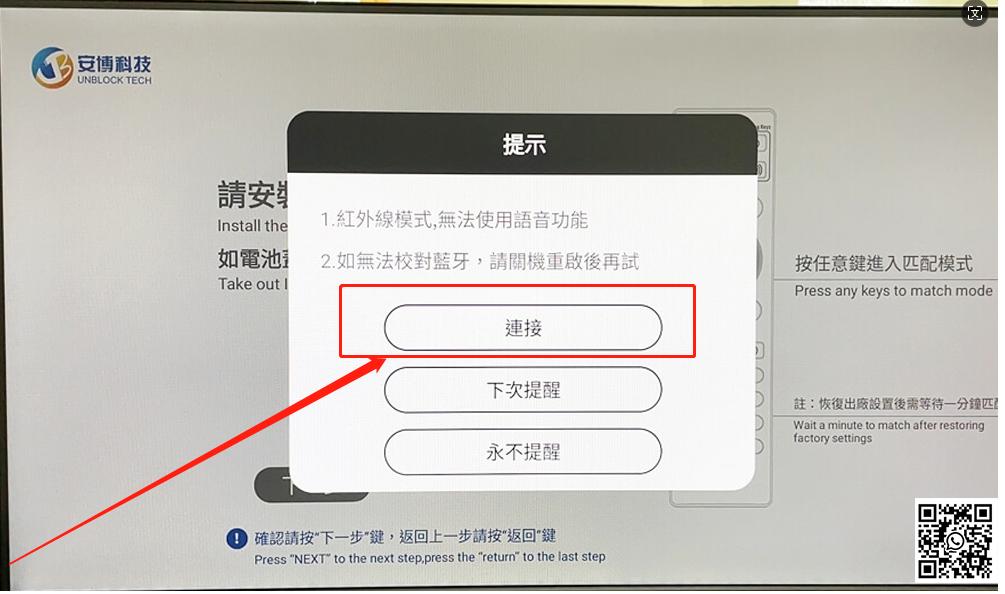
Step 2: Pair the Remote Control
You'll need to set up the Bluetooth connection to ensure your remote control works seamlessly with your UBox.

Step 3: Language Selection
The Unblock TV box supports 5 languages, Simplified Chinese, Traditional Chinese, English, Korean, and Japanese. As for the system, it can support many types. You can enter Settings>Device Preferences>Language to select your preferred language from the options displayed.

Step 4: Connect to the Internet
You can connect your Unblock TV box to the internet using either an Ethernet cable or Wi-Fi. For Wi-Fi, select your home network from the list and enter the password.

Step 5: Access the Settings Interface
Once connected, you will enter the settings interface of your Ubox.

Step 6: Please install APP from APP market or UB6789.com.

Setting up your Unblock TV BOX is a straightforward process that anyone can do, regardless of technical expertise. With its user-friendly interface and extensive range of features, UBox offers a seamless and immersive entertainment experience for users worldwide. . Follow these simple steps to unleash the full potential of your ubox and unlock a world of entertainment possibilities!
Overall, UBox is a choice worth having. With 13 years of brand history, you can trust and enjoy the quality experience this product offers.



