 USD
USD EUR
EUR GBP
GBP CAD
CAD AUD
AUD HKD
HKD JPY
JPY KRW
KRW SGD
SGD NZD
NZD THB
THB TWD
TWD 繁體中文
繁體中文 日本語
日本語 한국어
한국어 ไทย
ไทย Français
 Español
 Deutsch
 Português
 italiano
 Nederlands
 English



By UnblockTechTVBox | 15 January 2024 | 0 Comments
How to remove the arrow on the screen?
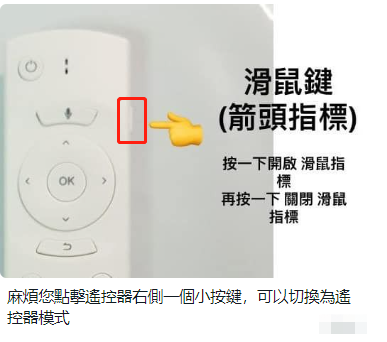
When you were using Unblock TV box, when accidentally pressed a certain key, which caused an arrow to appear on the TV screen, which looked very inconvenient.
How to remove the arrow? It's very simple, just press the small button on the right side of the remote control to remove it.
If you still have any other questions, please feel free to contact our UnblockTechTV Box Sales Team
How to remove the arrow? It's very simple, just press the small button on the right side of the remote control to remove it.
If you still have any other questions, please feel free to contact our UnblockTechTV Box Sales Team
* Email: sales@unblocktechtvbox.com
* WhatsApp/WeChat: +852 5263 3943(Miss Sabrina)
POPULAR BLOG
- How to Choose an Android TV Box in the US and Canada?
- Smart TV vs. Android TV Box: Which Is Better for Your Home Entertainment?
- UBOX12 vs UBOX12 Pro: How to Identify the Latest Official UBOX12 Model?
- The Ultimate Cord-Cutter's Guide: A Deep Dive Review of the UnBlockTech UBOX12 PRO
- UnBlockTech UBOX 12 Review 2026: A Deep Dive Into the Global Android TV Box!
ARCHIVES



